

How to convert AVCHD.MTS files to mpg/mpeg easily?
 Tutorial:
We always get AVCHD.mts files from Brand camcorder, like Canon, Sony, Panasonic, JVC etc, but we can not play, edit, upload, import these files freely, as they can not be widely compatible with various multimedia device.
Then, there is a way, we can convert our AVCHD.mts files to MPG/MPEG.
MPG video file is a special case of the MPEG video and audio compression format, optimized for broadcast quality video. MPG videos have the file extension .mpg. It is a common video format supported by many devices and softwares like Microsoft Windows Media Player, CyberLink PowerDirector, Windows Movie Maker, Creative Zen etc for entertainment.

 Get full version
  Download MTS Video Converter trial version
MTS to MPG converter supports convert MTS files to MPG, MTS to MPEG, MTS to MPEG-1/2/4, Even AVCHD.mts.m2ts.ts.trp.tp to mpg, mpeg-1/2/4 on Windows 7, vista, xp, 2000 etc.
Surely, MTS to MPG converter tool can help import AVCHD .mts files to Windows Movie Maker, Sony Vegas, Adobe premiere, iPad, iPhone, iPod, Blackberry, Creative Zen, PSP, iRiver, Apple TV, 3G phone, Gphone, DVD Creator etc.
What`s more, MTS to MPG software allows you to convert AVCHD/MTS files to AVI, WMV, MOV, 3GP, 3G2, MPG, MPEG-2, MPEG-4, FLV, MP4, MKV, DV, Flash.SWF, RM, RMVB, HD MOV, HD WMV, HD MPG, HD MP4, HD AVI etc , extract audio from video and save as: MKA, MP3, WAV, M4A, AC3, AAC, AIFF, AMR, FLAC, WMA, MP2 etc and edit mts files through merge,setting parameter, apply effect, crop(4:3/16:9), trim, rotate, snapshot, split, cut, clip etc.
Note: this guides is only for Windows user. If you using Mac OS, Please Click here to learn convert mts to mpg for itunes, quicktime on mac.
Three easy steps to convert and import AVCHD.mts files to MPG/MPEG
Step1: Download MTS to MPG converter on your PC.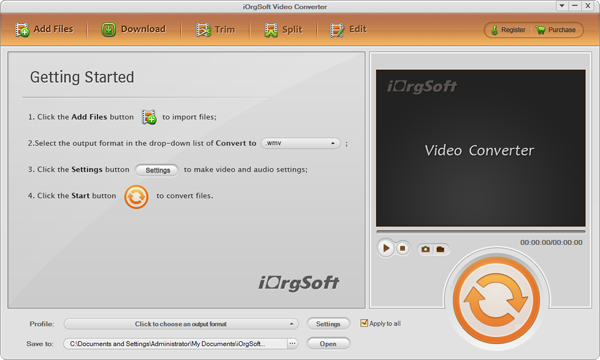
Step2: Add MTS files, Set output as MPG, Save
Click "Add files" to import mts files, batch convert allowed, then click"drop-down menu of the Profile" button to choose mpg as the output format and Click "green arrow of Output " to save the converted files to the appropriate location as you wish.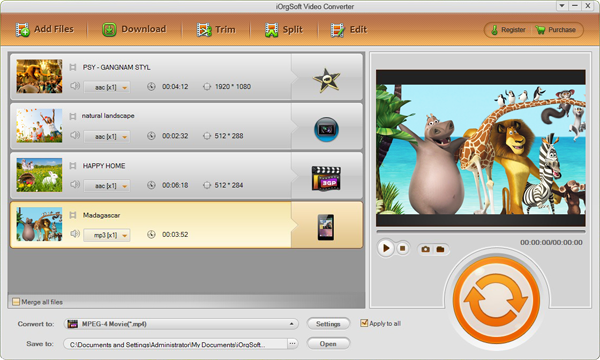
Step optional: Edit mts files using MTS to MPG converter
1: Clip mts files: set starting time and ending time to choose your favourite part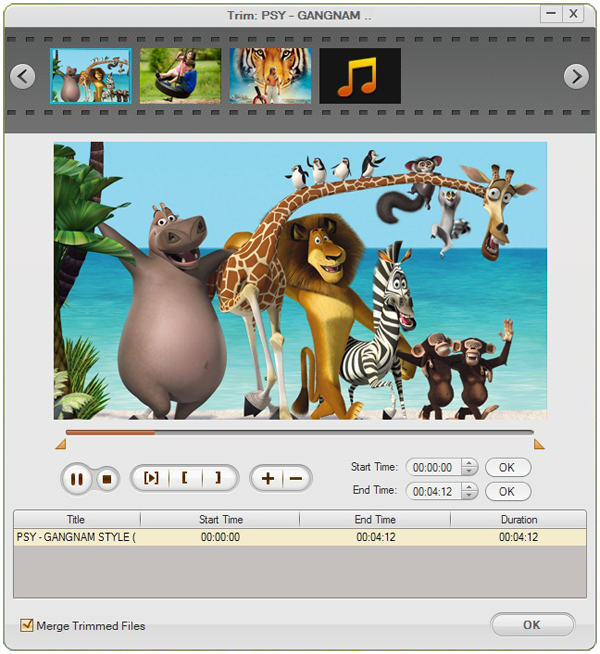
2: Crop:set aspect ratio, original, 16:9, 4:3, full screen 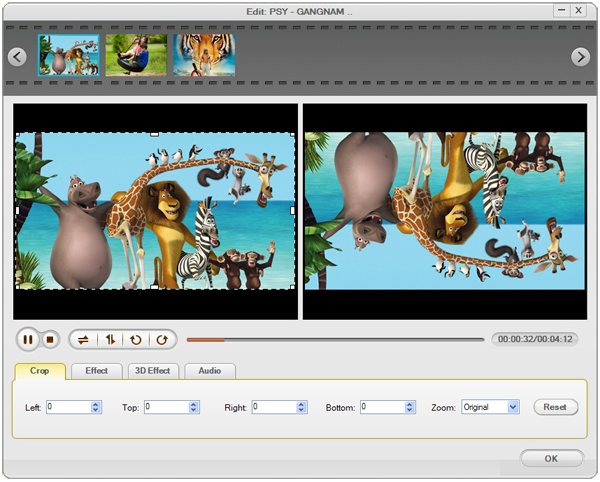
More just try by yourself.
Step three: Click"Start" to convert AVCHD.mts files to mpg/mpeg.
Related: